
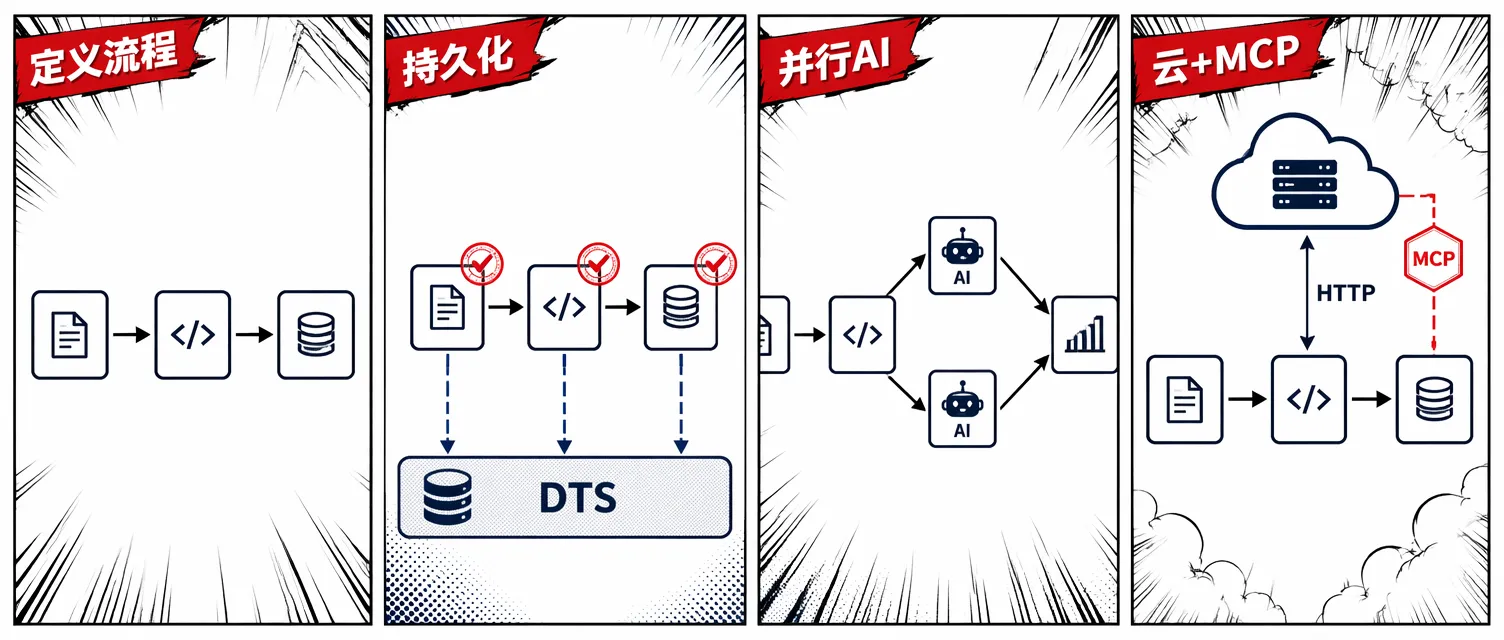
Microsoft Agent Framework(MAF) 是微软开源的多语言 AI Agent 构建框架。自 Preview 发布以来,它增加了一套工作流编程模型:你把若干”执行单元”(Executor)用有向图连接起来,框架负责数据流转、错误传播和执行调度。
这篇文章跟着官方博客的节奏,从一个 .NET 控制台应用开始,依次演示如何让同一份工作流定义获得持久化能力、并行 AI Agent 执行和 Azure Functions 云托管——每一步的 Executor 代码都不需要改动。
工作流的两个核心概念
Executor:最小工作单元
Executor<TInput, TOutput> 是工作流的原子步骤。它接收上游传来的 TInput,处理后输出 TOutput 交给下游。泛型类型参数在编译期就能约束上下游之间的数据契约。
internal sealed class OrderLookup()
    : Executor<OrderCancelRequest, Order>("OrderLookup")
{
    public override async ValueTask<Order> HandleAsync(
        OrderCancelRequest message,
        IWorkflowContext context,
        CancellationToken cancellationToken = default)
    {
        await Task.Delay(TimeSpan.FromMilliseconds(100), cancellationToken);
        return new Order(
            Id: message.OrderId,
            OrderDate: DateTime.UtcNow.AddDays(-1),
            IsCancelled: false,
            CancelReason: message.Reason,
            Customer: new Customer(Name: "Jerry", Email: "jerry@example.com"));
    }
}
WorkflowBuilder:连边成图
WorkflowBuilder 把多个 Executor 连成有向图。框架在编译期就验证:每条边的上游输出类型必须和下游输入类型匹配。
OrderLookup orderLookup = new();
OrderCancel orderCancel = new();
SendEmail sendEmail = new();

// OrderLookup ──► OrderCancel ──► SendEmail
Workflow cancelOrder = new WorkflowBuilder(orderLookup)
    .WithName("CancelOrder")
    .WithDescription("Cancel an order and notify the customer")
    .AddEdge(orderLookup, orderCancel)
    .AddEdge(orderCancel, sendEmail)
    .Build();
先在内存中跑起来
最快的验证方式是 InProcessExecution.RunStreamingAsync,零基础设施、零外部依赖:
dotnet add package Microsoft.Agents.AI
dotnet add package Microsoft.Agents.AI.Workflows
var cancelRequest = new OrderCancelRequest(OrderId: "123", Reason: "Wrong color");
await using StreamingRun run =
await InProcessExecution.RunStreamingAsync(cancelOrder, input: cancelRequest);
await foreach (WorkflowEvent evt in run.WatchStreamAsync())
{
if (evt is ExecutorCompletedEvent completed)
Console.WriteLine($"{completed.ExecutorId}: {completed.Data}");
}dotnet run 即可运行,适合本地开发和快速原型。
让工作流持久化
内存运行最大的问题是:进程一旦退出,所有状态就消失了。真实场景里 AI Agent 可能需要跑几分钟甚至更长,也需要跨机器分布式执行。
Microsoft.Agents.AI.DurableTask 包基于 Durable Task 技术栈,给工作流带来:
- 自动 checkpoint:每个 Executor 完成后立即持久化,重启不丢进度
- 分布式执行:同一工作流的不同 Executor 可以在不同机器上运行
- 可观测性:内置 Dashboard,可以查看每步的输入输出和执行时间线
dotnet add package Microsoft.Agents.AI.DurableTask --prerelease
dotnet add package Microsoft.DurableTask.Client.AzureManaged
dotnet add package Microsoft.DurableTask.Worker.AzureManaged
dotnet add package Microsoft.Extensions.Hosting
启动本地 DTS Emulator
持久化运行时需要一个后端来存储工作流状态,本地开发用 Docker 一条命令启动:
docker run -d --name dts-emulator \
  -p 8080:8080 -p 8082:8082 \
mcr.microsoft.com/dts/dts-emulator:latest8080:Scheduler 端点(应用连接这里)8082:Dashboard UI(浏览器打开http://localhost:8082)
切换到持久化运行时
关键点在于:工作流定义代码一行不改,只换 Host 配置:
string dtsConnectionString =
    Environment.GetEnvironmentVariable("DURABLE_TASK_SCHEDULER_CONNECTION_STRING")
    ?? "Endpoint=http://localhost:8080;TaskHub=default;Authentication=None";

IHost host = Host.CreateDefaultBuilder(args)
    .ConfigureServices(services =>
    {
        services.ConfigureDurableWorkflows(
            workflowOptions => workflowOptions.AddWorkflow(cancelOrder),
            workerBuilder: builder => builder.UseDurableTaskScheduler(dtsConnectionString),
            clientBuilder: builder => builder.UseDurableTaskScheduler(dtsConnectionString));
    })
    .Build();

await host.StartAsync();

IWorkflowClient workflowClient = host.Services.GetRequiredService<IWorkflowClient>();
IAwaitableWorkflowRun run = (IAwaitableWorkflowRun)
    await workflowClient.RunAsync(cancelOrder, new OrderCancelRequest("12345", "Wrong color"));

string? result = await run.WaitForCompletionAsync<string>();
Console.WriteLine($"Workflow completed. {result}");
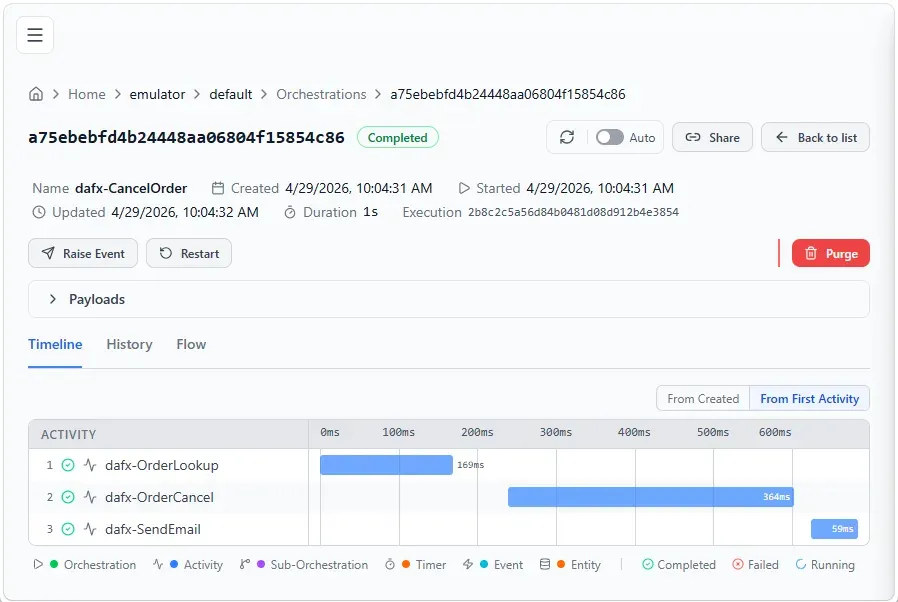
工作流完成后,打开 http://localhost:8082,可以看到每个 Executor 的执行时间线和输入输出。Dashboard 里的 Executor 名字带 dafx- 前缀(例如 dafx-OrderLookup)。
AI Agent 并行执行:Fan-Out / Fan-In
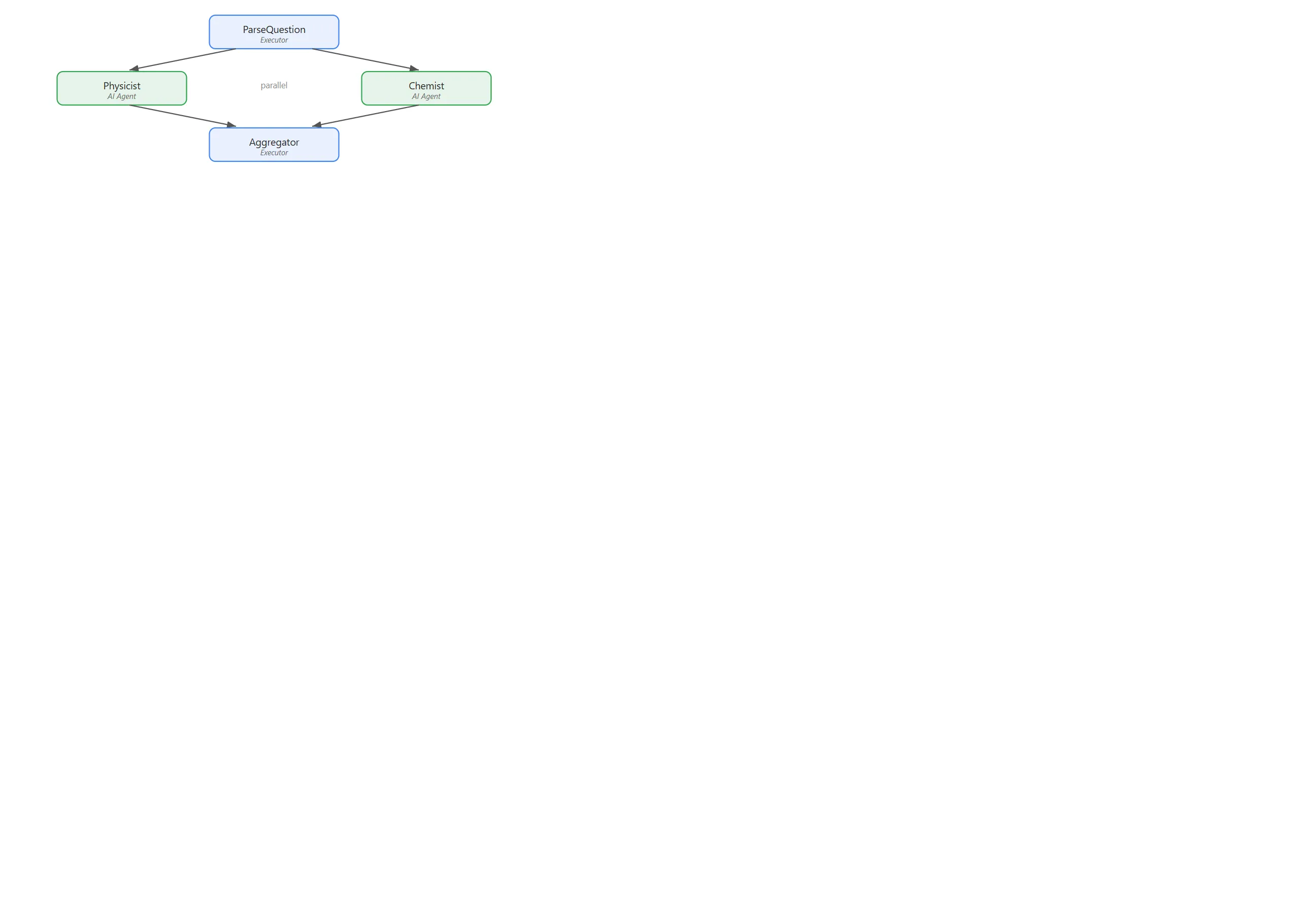
当多个 Agent 需要对同一输入并发处理时,用 AddFanOutEdge + AddFanInBarrierEdge:
// AI agents as executors
AIAgent physicist = chatClient.AsAIAgent(
    "You are a physics expert. Be concise (2-3 sentences).", "Physicist");
AIAgent chemist = chatClient.AsAIAgent(
    "You are a chemistry expert. Be concise (2-3 sentences).", "Chemist");

// ParseQuestion -> [Physicist, Chemist] -> Aggregator
Workflow workflow = new WorkflowBuilder(parseQuestion)
    .WithName("ExpertReview")
    .AddFanOutEdge(parseQuestion, [physicist, chemist])
    .AddFanInBarrierEdge([physicist, chemist], aggregator)
    .Build();
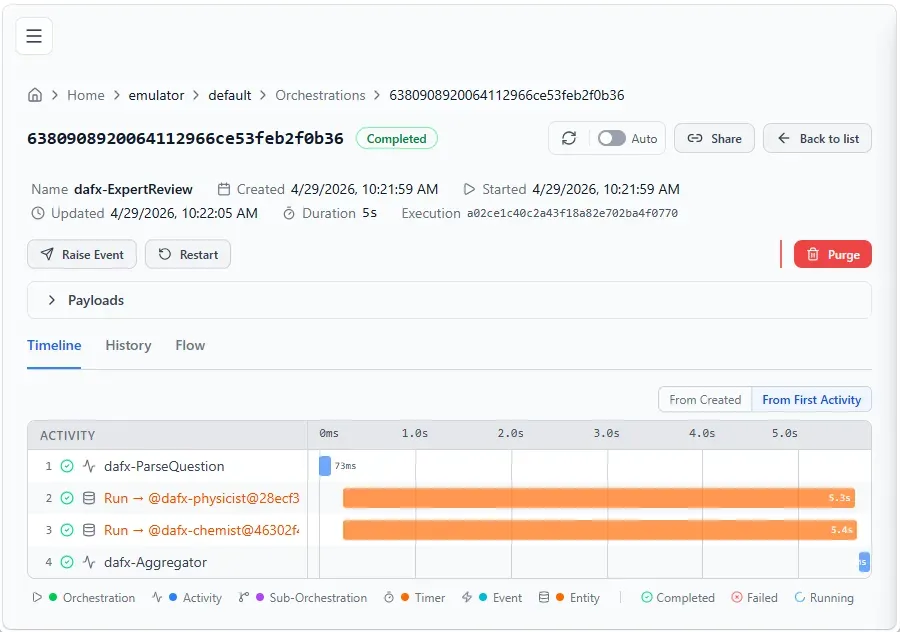
AsAIAgent 扩展方法把 ChatClient + 系统提示词直接包装成 Executor。AddFanOutEdge 把同一消息发给多个 Executor 并行处理,AddFanInBarrierEdge 等所有分支都完成后才继续。
由于跑在 Durable Task 分布式运行时上,Physicist Agent 可能在 VM-A 执行,Chemist Agent 在 VM-B 执行,各自结果独立 checkpoint——进程中途重启也不会重跑已完成的 Agent。
注意这里要用 ConfigureDurableOptions(而不是 ConfigureDurableWorkflows),它同时开放 options.Workflows 和 options.Agents,允许在同一 Host 里注册独立 Agent 和工作流。
托管到 Azure Functions
Microsoft.Agents.AI.Hosting.AzureFunctions 把 MAF 工作流接入 Azure Functions 运行时,一个扩展方法搞定:
dotnet add package Microsoft.Agents.AI.Hosting.AzureFunctionsusing IHost app = FunctionsApplication
.CreateBuilder(args)
.ConfigureFunctionsWebApplication()
.ConfigureDurableWorkflows(workflows => workflows.AddWorkflow(cancelOrder))
.Build();
app.Run();.ConfigureDurableWorkflows() 会自动把工作流翻译成 Durable Functions 原语:
- 工作流本身变成编排函数(orchestrator function)
- 每个 Executor 变成活动函数(activity function),自带重试、checkpoint 和容错
- 每个注册的工作流自动生成一条 HTTP 触发器:
POST /api/workflows/CancelOrder/run
Azure Functions 的优势:自动弹性扩容、Application Insights 监控、零基础设施运维。
调用工作流
POST http://localhost:7071/api/workflows/CancelOrder/run
Content-Type: text/plain

12345
默认返回 202 Accepted + 运行 ID,异步执行。如果需要同步等待结果,加请求头:
x-ms-wait-for-response: trueHuman-in-the-Loop:人工审批门
RequestPort 是一类特殊 Executor:到达时暂停工作流,等待外部输入后才继续。托管到 Azure Functions 后,框架自动生成检查待审批请求和提交响应的 HTTP 端点。
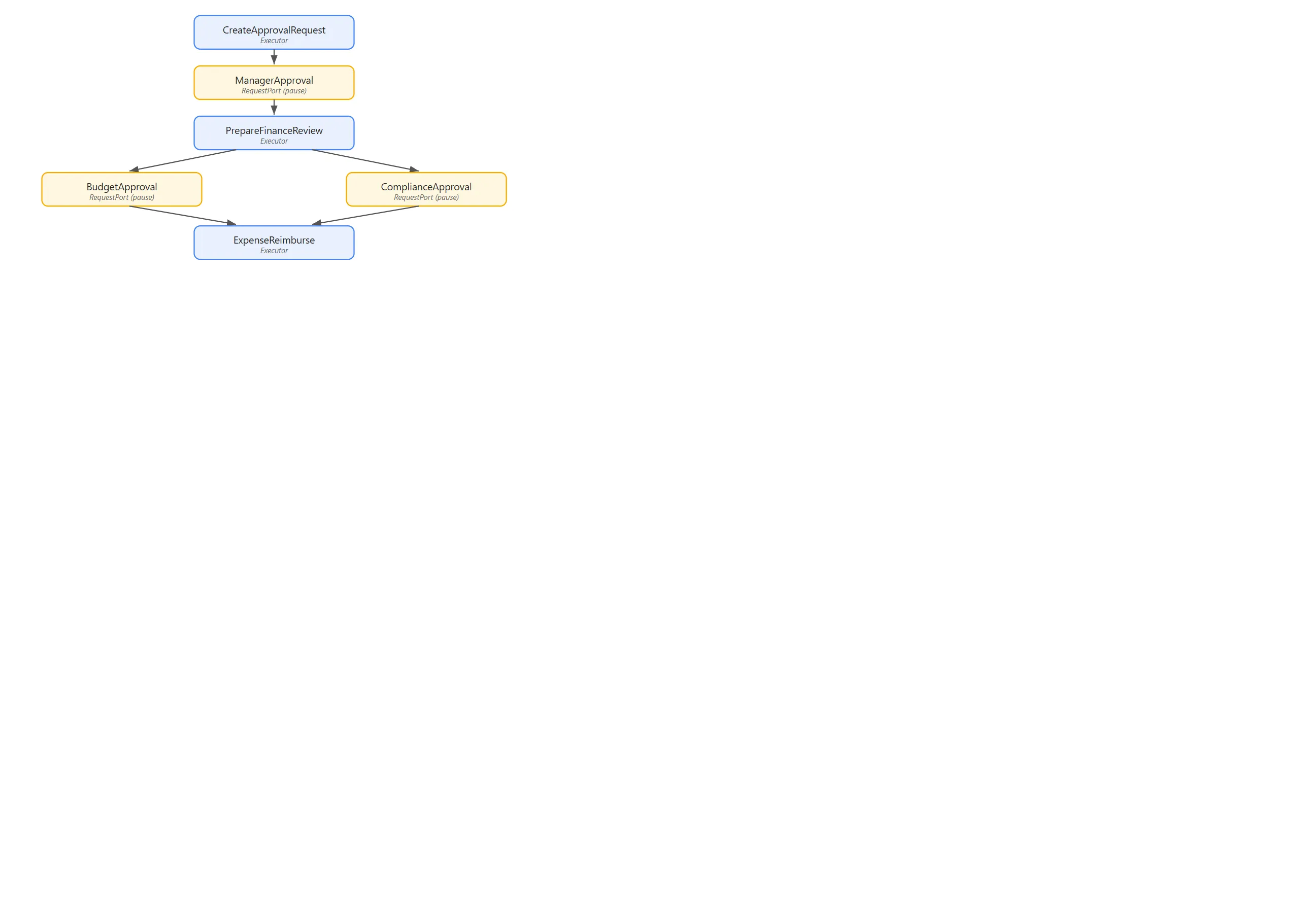
以下是一个报销审批工作流:先经过经理审批,再并行走预算和合规两个财务审批,最后执行报销:
RequestPort<ApprovalRequest, ApprovalResponse> managerApproval =
    RequestPort.Create<ApprovalRequest, ApprovalResponse>("ManagerApproval");

Workflow expenseApproval = new WorkflowBuilder(createRequest)
    .WithName("ExpenseReimbursement")
    .AddEdge(createRequest, managerApproval)
    .AddEdge(managerApproval, prepareFinanceReview)
    .AddFanOutEdge(prepareFinanceReview, [budgetApproval, complianceApproval])
    .AddFanInBarrierEdge([budgetApproval, complianceApproval], reimburse)
    .Build();
外部系统或前端提交审批结果:
POST http://localhost:7071/api/workflows/ExpenseReimbursement/respond/{runId}
Content-Type: application/json

{
  "eventName": "ManagerApproval",
  "response": { "approved": true, "comments": "Looks good" }
}
将工作流暴露为 MCP 工具
一个参数,工作流就变成可被 AI Agent 调用的 MCP 工具:
.ConfigureDurableWorkflows(workflows =>
{
    workflows.AddWorkflow(orderLookupWorkflow,
        exposeStatusEndpoint: false,
        exposeMcpToolTrigger: true);
})
Functions 主机在 /runtime/webhooks/mcp 生成远程 MCP 端点,.WithName() 和 .WithDescription() 直接映射为 MCP tool 名称和描述。GitHub Copilot、VS Code 扩展以及任何 MCP 兼容客户端都可以发现并调用这些工作流。
其他工作流模式
这些模式在内存运行时和持久化运行时上都有效:
条件路由:根据上游输出路由到不同分支:
builder.AddSwitch(spamDetector, switchBuilder =>
    switchBuilder
        .AddCase(result => result is DetectionResult r && r.Decision == SpamDecision.NotSpam, emailAssistant)
        .AddCase(result => result is DetectionResult r && r.Decision == SpamDecision.Spam, handleSpam)
.WithDefault(handleUncertain));共享状态:并行 Executor 之间通过作用域 key-value 共享数据:
// 写入共享状态
await context.QueueStateUpdateAsync(fileID, fileContent,
    scopeName: "FileContentState", cancellationToken);

// 另一个 Executor 读取
var fileContent = await context.ReadStateAsync<string>(
message, scopeName: "FileContentState", cancellationToken);子工作流:把一个工作流嵌套为另一个工作流里的 Executor,构建层次化架构:
ExecutorBinding subWorkflowExecutor = subWorkflow.BindAsExecutor("TextProcessing");

var mainWorkflow = new WorkflowBuilder(prefix)
    .AddEdge(prefix, subWorkflowExecutor)
    .AddEdge(subWorkflowExecutor, postProcess)
    .Build();
在持久化运行时上,子工作流以子编排(sub-orchestration)方式执行,结果正确传播。
小结
MAF 工作流的核心设计选择是:工作流定义和运行时解耦。同一份 WorkflowBuilder 代码,换一个 Host 配置就能在内存、DTS 持久化或 Azure Functions 上运行,Executor 代码零改动。从本地开发到生产部署的路径很清晰:
- 先用
InProcessExecution在本地验证逻辑 - 用
ConfigureDurableWorkflows+ DTS Emulator 验证持久化行为 - 用
AzureFunctions包部署到云端,自动获得弹性扩容和 HTTP/MCP 端点