
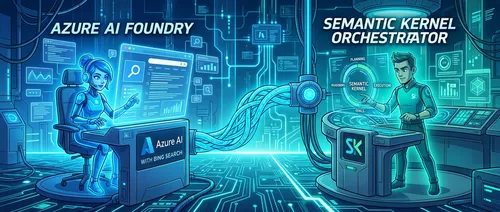
如果你的项目之前直接调用 Bing Search REST API,现在需要认真看一下这篇文章了——微软已宣布停用直接 Bing Search API 访问,今后 Bing 的搜索能力只能通过 Azure AI Foundry 内的 Agent 工具(即 Bing Grounding)来使用。
这个变化打破了”直接调用一个 HTTP 接口拿搜索结果”的简单模式,开发者需要在架构上多走一层。本文来自微软 ISE(Industry Solutions Engineering)工程博客,展示了用 A2A 协议把 Foundry 里的搜索 Agent 包装成 Semantic Kernel 插件工具的完整方案。
问题在哪
Bing Grounding 功能目前被封装在 Azure AI Foundry Agent 内部。这造成了一个服务边界:用 Semantic Kernel 或 LangChain 构建的外部 Agent,无法像调用函数库那样直接使用 Bing 搜索——必须经过一个在 Foundry 生态内托管的中间 Agent 来代理请求。
这意味着你需要一套可靠的 Agent 间通信协议,而不是简单的函数调用。
解决方案:双 Agent 架构
方案把职责拆成两个独立的 Agent:
- 搜索专家(Azure AI Foundry Agent):配置了 Bing Grounding 工具,负责处理搜索请求——包括查询构造、执行和结果解析。
- 协调者(Semantic Kernel Agent):面向用户,维持对话上下文,在需要外部信息时把搜索任务委派给搜索专家。
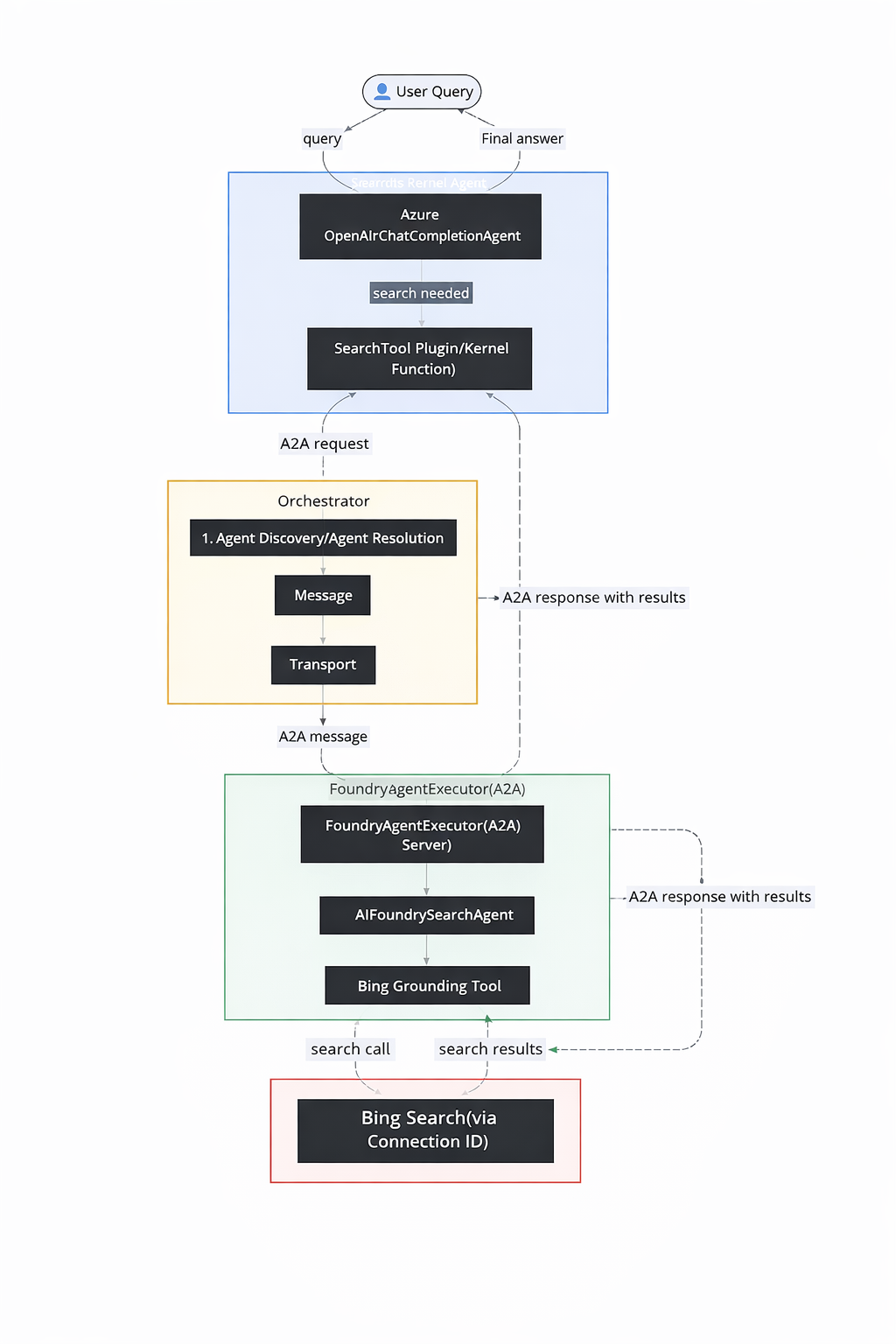
两者之间通过 A2A(Agent-to-Agent)协议 通信,Semantic Kernel 的一侧把远程 Foundry Agent 当作一个本地工具来调用。
配置 Azure 侧的 Bing Grounding
在写代码之前,先要在 Azure 门户里把连接建好:
- 打开 Azure AI Studio,进入目标项目
- 在左侧导航找到 Connections(连接)
- 新建连接,选择 Bing Search,填入你的 Bing Search API 密钥
- 创建成功后,系统会给出一个 Connection ID,把它存入环境变量
BING_CONNECTION_ID
这个 Connection ID 是后续代码的关键凭据,务必妥善保存。
A2A 协议深入:Agent 之间怎么说话
Google 提出的 A2A 协议为跨框架的 Agent 提供了一套标准化的通信接口。其核心逻辑分三层:
Agent 发现
A2A 协议通过”Agent Card”来广播能力。客户端先拿到 Agent Card,再初始化通信客户端:
# 客户端发现过程
resolver = A2ACardResolver(httpx_client=httpx_client, base_url=base_url)
agent_card = await resolver.get_agent_card()
Agent Card 里包含该 Agent 的能力描述、支持的消息格式和通信端点,让调用方在通信前就知道对面能做什么。
消息结构
A2A 消息格式统一,每条消息都有:
request = SendMessageRequest(
    id=str(uuid4()),                    # 请求唯一标识
    params=MessageSendParams(
        message={
            "messageId": uuid4().hex,   # 消息追踪 ID
            "role": "user",             # 发送方角色
            "parts": [{"text": user_input}],  # 消息内容
            "contextId": str(uuid4()),  # 对话上下文
        }
    )
)
这四个字段分别解决:请求追踪、角色区分、多类型内容支持,以及跨多轮的对话上下文管理。
把远程 Agent 包装成 Semantic Kernel 插件
整个集成的关键代码在这里——把 A2A 调用封装成一个普通的 Semantic Kernel @kernel_function:
class SearchTool:
    @kernel_function(
        description="web search using search agent",
        name="web_Search"
    )
    async def web_search(self, user_input: str) -> str:
        timeout = httpx.Timeout(120.0, connect=60.0)

        async with httpx.AsyncClient(timeout=timeout) as httpx_client:
            # Step 1: 发现 Agent
            resolver = A2ACardResolver(httpx_client=httpx_client, base_url=base_url)
            agent_card = await resolver.get_agent_card()

            # Step 2: 初始化客户端
            client = A2AClient(httpx_client=httpx_client, agent_card=agent_card)

            # Step 3: 构造消息
            request = SendMessageRequest(
                id=str(uuid4()),
                params=MessageSendParams(
                    message={
                        "messageId": uuid4().hex,
                        "role": "user",
                        "parts": [{"text": user_input}],
                        "contextId": str(uuid4()),
                    }
                )
            )

            # Step 4: 发送并等待响应
            response = await client.send_message(request)

            # Step 5: 提取结果文本
            result = response.model_dump(mode='json', exclude_none=True)
            return result["result"]["parts"][0]["text"]


supervisor_agent = ChatCompletionAgent(
    service=AzureChatCompletion(
        api_key=os.getenv("AZURE_OPENAI_API_KEY"),
        endpoint=os.getenv("AZURE_OPENAI_ENDPOINT"),
        deployment_name=os.getenv("AZURE_OPENAI_DEPLOYMENT_NAME"),
        api_version=os.getenv("AZURE_OPENAI_API_VERSION"),
    ),
    name="SupervisorAgent",
    instructions="You are a helpful general assistant. Use the provided tools to assist users with their ask on latest news and search.",
    plugins=[SearchTool()]
)
SearchTool 被注册为 Semantic Kernel 插件后,LLM 会在用户发出搜索类请求时自动调用它,整个 A2A 通信对上层完全透明。
服务端:搜索 Agent 的实现
Foundry 侧的 Agent 按照 A2A 协议暴露服务:
class AIFoundrySearchAgent:
    def __init__(self):
        self.endpoint = os.getenv("AZURE_AI_ENDPOINT")
        self.model = os.getenv("AZURE_OPENAI_DEPLOYMENT_NAME")
        self.conn_id = os.getenv("BING_CONNECTION_ID")
        self.credential = DefaultAzureCredential()
        self.threads: dict[str, str] = {}

        agents_client = AgentsClient(
            endpoint=self.endpoint,
            credential=self.credential,
        )

        # 用连接 ID 初始化 Bing Grounding 工具
        bing = BingGroundingTool(connection_id=self.conn_id)

        # 创建专用搜索 Agent
        self.agent = agents_client.create_agent(
            model=self.model,
            name='foundry-search-agent',
            instructions="An intelligent bing search agent powered by Azure AI Foundry. Your capabilities include Latest news and Web search. Return in 1 line only",
            tools=bing.definitions,
        )


class FoundryAgentExecutor(AgentExecutor):
    async def execute(self, context: RequestContext, event_queue: EventQueue) -> None:
        user_input = context.get_user_input()
        context_id = context.context_id

        task = context.current_task
        if not task:
            task = new_task(context.message)
            await event_queue.enqueue_event(task)

        # 执行搜索,结果通过 A2A 事件队列返回
        result = await self.agent.search(user_input, context_id)
        await event_queue.enqueue_event(new_agent_text_message(result))
FoundryAgentExecutor 实现了 A2A 协议要求的 execute 接口,负责接收请求、调用 Bing Grounding,再把结果通过事件队列返回给调用方。
用 A2A Inspector 测试
A2A Inspector 是一个 Web 工具,可以直接对接任何实现了 A2A 协议的服务端,查看请求/响应的原始结构,验证协议兼容性,方便调试和规范对齐。
A2A 协议的架构价值
这套方案引入了多个可量化的架构收益:
- 平台无关性:Semantic Kernel、LangChain 或其他框架构建的 Agent 都能通过 A2A 互通
- 松耦合:只要 A2A 兼容性保持不变,任何一侧的 Agent 都可以独立升级或替换
- 可扩展性:新的 Agent 能力可以随时加入生态,不需要修改现有组件
- 可描述性:标准化的消息格式让监控和排错更直观
原文作者 Munish Malhotra 特别指出:这不只是对 API 停用的被动应对,而是在建立一种更现代的能力组合方式——把外部能力视作”专门化 Agent”而非”简单 API”,整个系统会更容易维护和演进。
环境变量清单
搭建这套方案需要配置以下环境变量:
| 变量名 | 用途 |
|---|---|
AZURE_OPENAI_API_KEY | Azure OpenAI API 密钥 |
AZURE_OPENAI_ENDPOINT | Azure OpenAI 端点 |
AZURE_OPENAI_DEPLOYMENT_NAME | 模型部署名称 |
AZURE_OPENAI_API_VERSION | API 版本 |
AZURE_AI_ENDPOINT | Azure AI Foundry 端点 |
BING_CONNECTION_ID | Bing Search 连接 ID(Azure AI Studio 中获取) |