
你正在用 .NET 写一个需要接入大模型的应用,手头有 OpenAI 的 SDK,也想跑一下本地的 Ollama 模型做对比。两套 SDK、两套 API 风格、两套请求响应结构,光是初始化代码就得写两遍。当你还想加上遥测、限流、内容审核这些横切关注点时,事情会变得更麻烦。
.NET 团队给出的答案是 Microsoft Extensions for AI(简称 MEAI),一个统一的 AI 抽象层。如果你用过 ASP.NET 的依赖注入和中间件管道,MEAI 的设计思路会非常熟悉。这是 .NET AI 四大基础组件系列文章的第一篇,后续还会覆盖 Microsoft.Extensions.VectorData(向量数据)、Microsoft Agent Framework(智能体框架)和 Model Context Protocol(MCP,模型上下文协议)。
一套接口,多个提供商
先看问题有多具体。用 OllamaSharp 调模型,代码长这样:
var uri = new Uri("http://localhost:11434");
var ollama = new OllamaApiClient(uri)
{
    SelectedModel = "mistral:latest"
};
await foreach (var stream in ollama.GenerateAsync("How are you today?"))
{
    Console.Write(stream.Response);
}
换成 OpenAI 的 SDK:
OpenAIResponseClient client = new("o3-mini", Environment.GetEnvironmentVariable("OPENAI_API_KEY"));

OpenAIResponse response = await client.CreateResponseAsync(
            [ResponseItem.CreateUserMessageItem("How are you today?")]
  );
foreach (ResponseItem outputItem in response.OutputItems)
{
    if (outputItem is MessageResponseItem message)
    {
        Console.WriteLine($"{message.Content.FirstOrDefault()?.Text}");
    }
}
两段代码做的事完全一样,但 API 形状完全不同。MEAI 引入了 IChatClient 接口来抹平这个差异。OllamaSharp 已经原生实现了 IChatClient,OpenAI 则通过适配器包 Microsoft.Extensions.AI.OpenAI 来桥接:
IChatClient client =
    new OpenAIClient(key).GetChatClient("o3-mini").AsIChatClient();
拿到 IChatClient 之后,不管底层是哪家提供商,调用方式完全一致:
await foreach (ChatResponseUpdate update in client.GetStreamingResponseAsync("How are you today?"))
{
    Console.Write(update);
}
换模型只改初始化那一行,业务逻辑一行不动。
结构化输出可以更简单
结构化输出让模型按你定义的 schema 返回数据,省去手动解析 JSON 的麻烦,同时也给模型提供了更多关于期望输出的上下文。用原生 OpenAI SDK 实现结构化输出,需要手动配置 ResponseFormat、设置 MaxOutputTokenCount、Temperature 等参数:
class Family
{
    public List<Person> Parents { get; set; }
    public List<Person>? Children { get; set; }

    class Person
    {
        public string Name { get; set; }
        public int Age { get; set; }
    }
}

ChatCompletionOptions options = new()
{
    ResponseFormat = StructuredOutputsExtensions.CreateJsonSchemaFormat<Family>("family", jsonSchemaIsStrict: true),
    MaxOutputTokenCount = 4096,
    Temperature = 0.1f,
    TopP = 0.1f
};

List<ChatMessage> messages =
[
    new SystemChatMessage("You are an AI assistant that creates families."),
    new UserChatMessage("Create a family with 2 parents and 2 children.")
];

ParsedChatCompletion<Family?> completion = chatClient.CompleteChat(messages, options);
Family? family = completion.Parsed;
同样的需求,用 MEAI 的泛型扩展方法只需要:
class Family
{
    public List<Person> Parents { get; set; }
    public List<Person>? Children { get; set; }

    class Person
    {
        public string Name { get; set; }
        public int Age { get; set; }
    }
}

var family = await client.GetResponseAsync<Family>(
    [
        new ChatMessage(
            ChatRole.System,
            "You are an AI assistant that creates families."),
        new ChatMessage(
            ChatRole.User,
            "Create a family with 2 parents and 2 children."
        )]);
适配器在幕后帮你搞定了 schema 生成、响应解析和反序列化。
标准化的请求与响应参数
你可能听说过模型的 temperature 参数。简单理解:temperature 越低,输出越确定、越贴近事实;temperature 越高,输出越随机,可能更”有创意”,但也可能出现幻觉(模型给出与事实不符或脱离上下文的信息)。
分类、摘要这类确定性任务适合低 temperature,而市场营销文案的头脑风暴可能需要高一些。MEAI 把这些参数统一收拢到 ChatOptions 类中,不管用哪家模型,设置方式一致。
响应端也是类似的思路。每个响应都带有 UsageDetails 实例,用来追踪 token 消耗量。
中间件管道
.NET Web 开发者对中间件管道(Middleware Pipeline)不会陌生。MEAI 把同样的模式用在了 AI 交互流程上,你可以在请求到达模型之前或响应返回之后插入自定义逻辑:
- 拦截恶意内容,阻止其发送到模型
- 限流或熔断
- 遥测和链路追踪
MEAI 内置了遥测和追踪中间件,通过熟悉的 builder 模式来配置。下面这个方法给任意 IChatClient 加上日志和 Open Telemetry(OTEL)事件,跟提供商无关:
public IChatClient BuildEnhancedChatClient(
            IChatClient innerClient,
            ILoggerFactory? loggerFactory = null)
        {
            var builder = new ChatClientBuilder(innerClient);

            if (loggerFactory is not null)
            {
                builder.UseLogging(loggerFactory);
            }

            var sensitiveData = false; // true for debugging

            builder.UseOpenTelemetry(
                configure: options =>
                    options.EnableSensitiveData = sensitiveData);
            return builder.Build();
        }
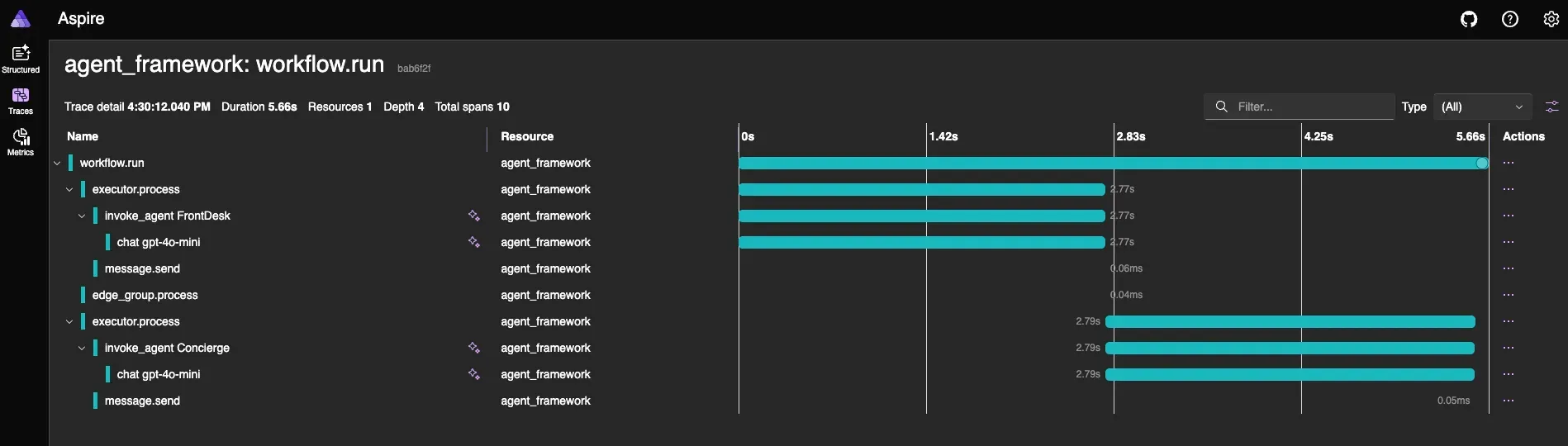
OTEL 事件可以发送到 Application Insights 这类云服务,也可以发到 Aspire Dashboard。Aspire 已经针对智能应用做了增强,在 Dashboard 中通过”闪光”图标标识与模型交互相关的 trace。
多模态对话:DataContent
现在的模型不只是收发文本。越来越多的多模态模型可以接受图片、音频等格式的输入并返回类似的内容。MEAI 中文本交互用 TextContent 表示,同时提供了多种基于 AIContent 的内容类型:
ErrorContent:包含错误代码的详细错误信息UserInputRequestContent:请求用户输入(包括FunctionApprovalRequestContent和FunctionApprovalResponseContent)FunctionCallContent:表示工具调用请求HostedFileContent:引用 AI 服务托管的数据UriContent:Web 资源引用
实际使用最多的是 DataContent,它本质上就是一个带 media type 的字节数组,能表示几乎任何媒体类型。比如要把一张照片传给模型做分析:
var instructions = "You are a photo analyst able to extract the utmost detail from a photograph and provide a description so thorough and accurate that another LLM could generate almost the same image just from your description.";

var prompt = new TextContent("What's this photo all about? Please provide a detailed description along with tags.");

var image = new DataContent(File.ReadAllBytes(@"c:\photo.jpg"), "image/jpeg");

var messages = new List<ChatMessage>
            {
                new(ChatRole.System, instructions),
                new(ChatRole.User, [prompt, image])
            };

record ImageAnalysis(string Description, string[] tags);

var analysis = await chatClient.GetResponseAsync<ImageAnalysis>(messages);
结构化输出和多模态输入可以组合使用,直接拿到强类型的分析结果。
还有什么
除了上面这些核心能力,MEAI 还提供了取消令牌支持、内置的错误处理与弹性机制、向量和嵌入的基础原语,以及图像生成相关的抽象。
这是 .NET AI 基础组件系列的第一篇。下一篇会聊向量数据扩展(Microsoft.Extensions.VectorData),解释为什么向量相关的功能被独立出来,之后还有 Agent Framework 和 MCP。如果想动手试试,这些资源可以跟进: