
大多数 .NET 团队都有一个这样的服务:跑了好几年,还在 .NET Framework 上,依赖用 new 拼出来而不是 DI,到处是 sync-over-async,几乎没有测试。它工作正常——这正是没人敢碰它的原因:任何改动都可能弄坏某个已经没人完全理解的角落。
这时候拿起 AI,最直觉的用法也是最糟的用法:**「把它重写成现代 .NET。」**把旧类粘进去,要一个干净版本,重复。结果是堆看起来合理但没有安全网的新代码,你在生产环境才发现弄坏了什么。
Stefan Đokić(Microsoft MVP,TheCodeMan)在 2026 年 8 月的这篇文章里给出另一种用法:**把 Claude 用在遗留代码上,价值不在生成重写,而在执行一套有纪律的增量现代化——系统全程保持工作。**他用一个 .NET Framework 4.8 样本 LegacyErp(WinForms + Dapper/ADO.NET 数据层)走完整条流程,每一步用什么 agent、什么规则,都写得清清楚楚。
这篇文章适合:手里有老 .NET 系统不敢动、又想让 AI 帮上忙的开发者。读完你能得到一套可以直接照搬的四步工作流,外加每步的 agent 配置和安全规则。
为什么「从零重写」必败
大爆炸式重写失败的原因,和写的人是人还是 AI 无关:
- 功能开发被冻结——重写期间没人加新功能
- 旧 bug 被复制,新 bug 被引入
- 无法证明新代码行为等同旧代码——旧行为从来没有被写下来,只存在于运行中的系统里
替代方案是 strangler-fig(绞杀藤)模式:先包裹住旧系统,然后一块一块替换,全程保持交付。起步更慢,收尾安全得多。下面每一步都建立在这个原则上。
Step 1:先诚实评估,不碰代码
第一件工作不是改代码,是理解代码。用一个 legacy-modernization-assistant agent 指向仓库,它的全部工作就是读代码库、产出一份按风险和价值排序的路线图——不允许编辑。工具集被刻意限制为只读:
---
name: legacy-modernization-assistant
description: Assesses a legacy .NET codebase and produces a pragmatic,
  incremental modernization roadmap, prioritized by risk and value.
tools: Read, Glob, Grep, Bash
---

## Operating principles
- Incremental over rewrite. Strangler-fig: wrap and replace piece by piece.
- Risk x value sequencing. Start where modernization is safe and pays off.
- Tests first where you'll change most.
- Be honest, not demoralizing. Name the debt plainly, give a doable path.
跑在 LegacyErp 上,它产出的路线图(节选)长这样:
# Modernization Roadmap — LegacyErp

## Honest assessment
Two-project .NET Framework 4.8 solution: a LegacyErp.Data class library
(Dapper/ADO.NET) and a LegacyErp.UI WinForms app. Old-style non-SDK .csproj,
packages.config. Small, but it carries most of the classic legacy risks at
once - and several are correctness or security bugs, not just "old style".

Load-bearing risks are in OrderRepository: a single SqlConnection opened in
the constructor and held open forever, SQL built by string concatenation
(injectable), no using on command/reader, and two stock writes that must be
atomic with no transaction. Serialize() uses BinaryFormatter - a security
hole and removed on modern .NET, so a hard migration blocker.

Platform blockers: System.Web referenced from a data library, System.ServiceModel
(WCF) in the UI, BinaryFormatter, and a Newtonsoft.Json version split (12.0.3
vs 13.0.1). WinForms itself runs on modern .NET, so the target is reachable.
No tests. Nothing can be safely refactored until that changes.

## Roadmap (incremental, sequenced)
Phase 1 — safe foundations: fix the SQL injection + missing transaction in
place on net48 behind characterization tests; packages.config -> PackageReference;
old .csproj -> SDK-style; introduce IOrderRepository + injected connection string.
Phase 2 — carve seams: connection-per-operation; make the data layer async;
fix UI threading + the static-event leak; replace BinaryFormatter.
Phase 3 — migrate: net48 -> .NET 8 -> .NET 9 one major at a time (verify between);
replace the WCF client; retarget WinForms to modern .NET.

## Quick wins
Parameterize SQL + add the TransferStock transaction; unsubscribe from the
static event; try/catch the async void handler; collapse Newtonsoft to one version.
给评估 pass 只读工具很关键:agent 不可能「好心」在你还什么都没决定之前就开始重写某个类——这正是你要避免的失败模式。你读路线图、批准顺序,然后才允许任何改动发生。
Step 2:先建安全网
无法验证的代码不能重构。在碰高风险部分之前,先给当前行为写测试——特征测试(characterization tests):记录代码现在做什么,无论对错,这样重构如果改变了行为你立刻能发现。
两个 skill 负责重活:
test-coverage-gap-finder:读代码库,报告哪些路径没有测试,按「无测试改动风险」排序——在LegacyErp里排最前的是SearchOrders和TransferStockxunit-test-generator:给即将改动的具体方法写 xUnit 测试
重点不是 100% 覆盖率,而是给下一步要碰的代码铺一张网。
Step 3:在测试注视下修债
现在按路线图动工,从安全性和正确性 bug 开始,这些不该等迁移。
SQL 注入 + 连接永不释放 + 同步 I/O。 样本里真实的 SearchOrders:
// Before: injectable, sync, shared connection never disposed
private SqlConnection _conn; // opened once in the constructor, held open

public DataTable SearchOrders(string customerName)
{
    string sql = "SELECT * FROM Orders WHERE CustomerName = '" + customerName + "'";
    SqlCommand cmd = new SqlCommand(sql, _conn);      // no using
    SqlDataReader reader = cmd.ExecuteReader();        // no using, sync
    // ...
}
修复是参数化查询、每次调用开连接、全部释放、改异步——现在安全了,因为 Step 2 已经给行为上了测试:
// After: parameterized, connection-per-call, disposed, async
public async Task<List<Order>> SearchOrdersAsync(string customerName)
{
    const string sql = "SELECT * FROM Orders WHERE CustomerName = @name";
    using var conn = new SqlConnection(_connectionString);
    using var cmd = new SqlCommand(sql, conn);
    cmd.Parameters.AddWithValue("@name", customerName);

    await conn.OpenAsync();
    using var reader = await cmd.ExecuteReaderAsync();

    var orders = new List<Order>();
    while (await reader.ReadAsync())
        orders.Add(Map(reader));
    return orders;
}
没人退订的静态事件。 WinForms 的 MainForm 在构造函数里订阅进程级静态事件 AppEvents.DataChanged 然后永远不放手,于是表单(以及它持有的一切)永远活着——教科书式的 .NET 内存泄漏:
// Before: subscribed in the constructor, never unsubscribed
public MainForm()
{
    InitializeComponent();
    AppEvents.DataChanged += OnDataChanged;
}

// After: unsubscribe when the form is disposed
protected override void Dispose(bool disposing)
{
    if (disposing)
        AppEvents.DataChanged -= OnDataChanged;
    base.Dispose(disposing);
}同一轮还覆盖路线图其余机械项:TransferStock 的两笔写入包进事务、async void 点击处理器加 try/catch、在框架升级前把 BinaryFormatter 换成 System.Text.Json(它内置实现已在 .NET 9 移除)。每一个都是小改动、可审查、背后有测试。
Step 4:拆缝,再升级
债清了,开始重塑结构。引入 IOrderRepository,让 UI 不再 new 数据层,改为注入、可测试。在更大的泥球里,modular-monolith-generator 能把纠缠的区域抽成一个边界清晰的模块——一条以后可以整体替换、不碰其余部分的 strangler 边界。
平台升级单独用一个 agent,因为它是另一种工作、另一种安全纪律:
---
name: dotnet-upgrade-agent
description: Plans and executes a .NET version upgrade across a solution -
  target framework bumps, breaking-change remediation, package updates.
tools: Read, Glob, Grep, Bash, Edit
---

## Operating principles
- Incremental, not big-bang. Upgrade one major at a time (6->8, then 8->9).
- Plan before editing. Show the plan and get approval before changing files.
- Verify continuously. Build and run tests after each stage.
- Cite sources for breaking changes rather than guessing.
对 LegacyErp 来说就是 net48 → .NET 8,验证全绿,再 .NET 8 → .NET 9——不是一步跳到最新。每次跳跃之间构建并测试;遇到需要人决策的事(WCF 客户端在现代 .NET 没有可直接替换的等价物),停下来问,而不是猜。
整个流程是一个循环
这整套东西不是通往重写的直线,而是以安全网为中心的循环:
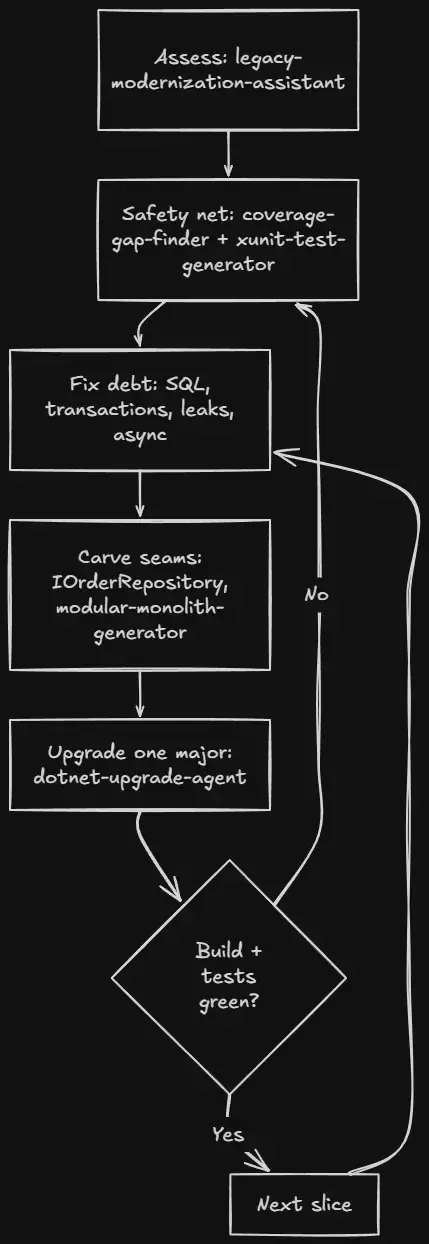
每个切片都走同一个循环。agent 干机械、繁琐、容易出错的部分;你做判断,并保持构建全绿。
安全规则清单
作者明确说「这些规则我从不跳过」:
- 评估只用只读工具——规划 pass 不能编辑文件,先产出路线图等你批准
- 没有测试就不重构——无法刻画当前行为就先写特征测试
- 安全和正确性 bug 最先修——SQL 注入和缺失的事务不该等迁移
- 一次只升一个主版本——每次跳跃之间验证构建全绿,绝不留着红构建过夜
- 改动小而可审查——大 AI diff 能藏大错误,每个切片小到你能真正读完
常见问题
能不能让 Claude 一次把遗留 .NET 应用重写完? 它能产出看起来像重写的东西,但你不该上线。没有特征测试、没有增量验证的重写,就是把旧 bug 搬进新代码再添新 bug。安全用法是测试托底的增量现代化,每一步应用都在工作。
什么是特征测试,为什么要先写? 捕获代码当前行为的测试——即使行为很怪——给你一条基线。重构后,失败的特征测试告诉你行为变了。没有它,你就是在盲改遗留代码。
要直接升到最新的 .NET 吗? 遗留系统跳跃式升级不要。一次一个主版本(比如 net48 → .NET 8,再 8 → 9),每步构建加测试。每次跳跃都有自己的破坏性变更,一次处理一个,失败才小、才好找。
AI 到底最有用在哪? 机械重复的活:找未测试路径、生成测试、参数化 SQL、把 async 走通调用链、替换 BinaryFormatter 这类过时 API。架构判断留给你,助手负责清掉枯燥的体量。
收尾
用 Claude 重构遗留 .NET 之所以有效,是因为你把它当工作流,而不是重写按钮:先做只读评估拿到排序路线图;给要改的代码上测试;在测试注视下先修 SQL 注入、缺失事务和内存泄漏这些安全与正确性 bug;然后拆缝,一次一个验证过的主版本升级平台。
这些步骤没有一个是新的——它们是有经验工程师处理遗留系统一直用的纪律。变的是:评估、测试脚手架、机械重写这些枯燥部分现在可以交给遵循纪律而不是抄近路的 agent。样本 LegacyErp 和本文的 agents 都来自作者的 AI for .NET Developers 社区(每周新增一个 agent),社区本身是推广渠道,工作流本身可独立照搬。