
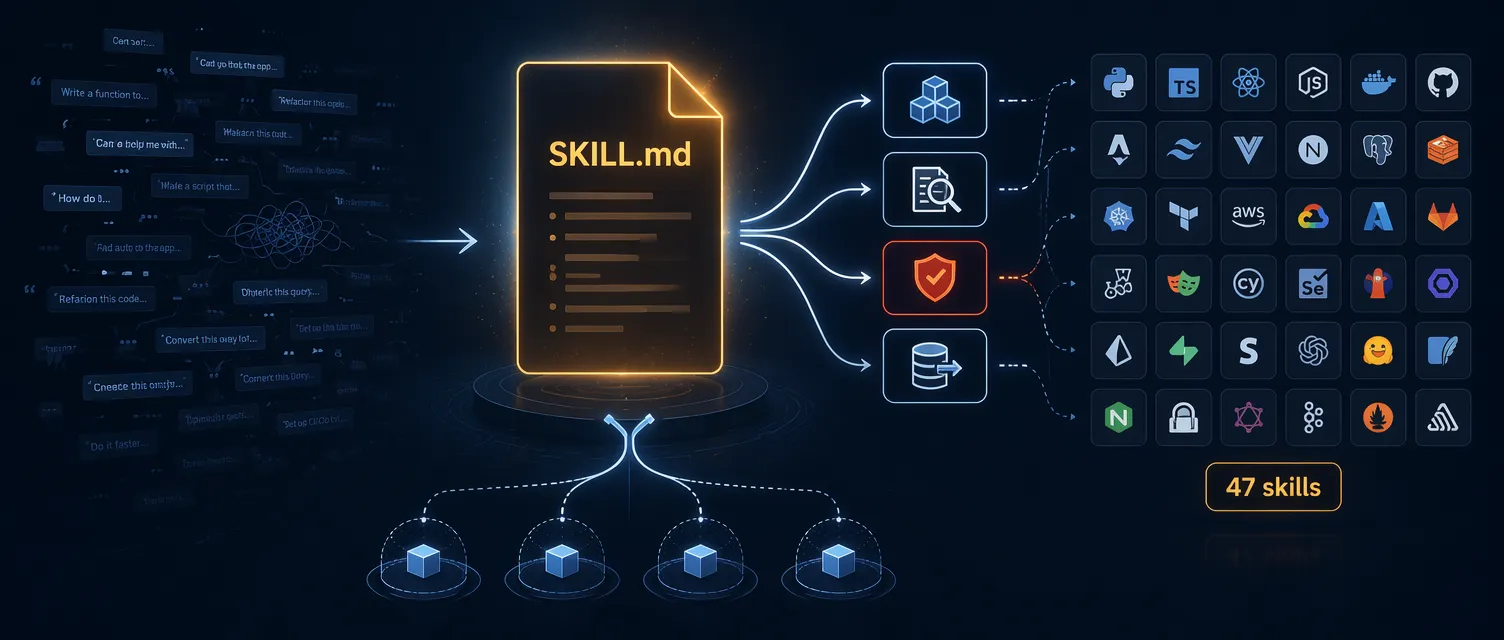
用 Claude Code 写了一段时间代码后,你大概已经积累了一批”救命 prompt”——Notion 里的一段 ASP.NET Core Controller 脚手架模板,IDE 代码片段里的 EF Core migration 指令,某个置顶消息里的项目 response 格式约定。
这些 prompt 本身写得不错。问题出在维护上:每次你改进一处——收紧一条 FluentValidation 规则、把 repository pattern 换成直接操作 DbContext、补一个 CancellationToken 说明——就产生了一个新版本。下次你要用,捡起来的可能是旧的那份,脚手架出来的代码就又偏了。
解决方法是让 prompt 住在一个地方,纳入版本控制,用一条命令调用。这个地方叫 Skill。
什么是 Skill
Skill 是一个 Claude Code 按需加载的可复用 Markdown 文件。你把操作步骤写进一个 SKILL.md,给它起个名字,之后用 /skill-name 调用,就像调用内置斜杠命令一样。
一个有用的类比:CLAUDE.md 是项目的常驻规则——每次会话自动加载的架构约定和代码风格。Skill 是你从工具架上取下来用的操作手册,只在需要时才读。你不会每天让人把部署 runbook 背一遍,但要部署时你会把它拿出来。
两者的分工:
| 维度 | CLAUDE.md / Rules | Skills |
|---|---|---|
| 加载时机 | 每次会话自动加载 | 按需调用,或 Claude 识别到匹配时自动触发 |
| 用途 | 持久上下文:架构、偏好、惯例 | 任务专用剧本:工作流、生成器、自动化 |
| 最适合 | ”始终使用 2 格缩进" | "生成带 DTO 和测试的 ASP.NET Core 端点” |
为什么不把所有东西都塞进 CLAUDE.md?上下文窗口预算。塞进去的每个 token 都会在每次会话中加载。如果你把 5000 字的端点脚手架指令、EF Core migration 手册、React 组件规范和部署清单全塞进去,大约要消耗 6500 token——占 200K 上下文的 3%。10 套工作流模板就用掉 30%,第一条 prompt 还没发出去。Skill 让你只在用到时才加载对应指令。
Skills 遵循 Agent Skills 开放标准,不是 Claude Code 专属格式。同样的 SKILL.md 可以在 Gemini CLI、Cursor、OpenAI Codex、GitHub Copilot 等工具里使用,你在写 skill 上的投入是可迁移的。
Claude 如何发现和加载 Skill
加载分两个阶段:
- 发现阶段(每次会话):Claude 扫描 skill 目录,只把所有 skill 的
description字段加载到上下文。成本极低,只是元数据,不是完整内容。 - 调用阶段(按需):当你输入
/skill-name,或 Claude 判断某个 skill 的 description 与你的请求匹配,完整SKILL.md才加载进来。
这意味着 description 字段写得好不好,直接决定自动调用是否靠谱。
创建第一个 Skill
假设你经常让 Claude 生成一个带有特定模式的 ASP.NET Core Controller——构造函数注入、正确的返回类型、XML 注释。每次手动描述很麻烦,把它做成 skill。
第一步:创建 Skill 目录
Project 级 skill 放在 .claude/skills/ 下;个人全局 skill 放在 ~/.claude/skills/。
mkdir -p .claude/skills/scaffold-controller第二步:写 SKILL.md
创建 .claude/skills/scaffold-controller/SKILL.md:
---
name: scaffold-controller
description: Scaffold an ASP.NET Core controller with constructor injection, proper response types, and XML documentation comments. Use when the user asks to create a new controller or API endpoint.
argument-hint: [entity-name]
---
# Scaffold ASP.NET Core Controller
Generate a new API controller for the `$ARGUMENTS` entity.
## Requirements
1. **File location**: `src/Api/Controllers/{EntityName}Controller.cs`
2. **Namespace**: Match the project's root namespace + `.Controllers`
3. **Base class**: Inherit from `ControllerBase`
4. **Attributes**: `[ApiController]` and `[Route("api/[controller]")]`
5. **Constructor injection**: Accept the service interface via constructor DI
6. **Response types**: Use `ActionResult<T>` return types with proper status codes
7. **XML comments**: Add `<summary>` docs on every public method
8. **Endpoints to generate**:
- `GET /api/{entity}` - list all (with pagination parameters)
- `GET /api/{entity}/{id}` - get by ID
- `POST /api/{entity}` - create
- `PUT /api/{entity}/{id}` - update
- `DELETE /api/{entity}/{id}` - delete
## Code Style
- Use `IActionResult` for delete, `ActionResult<T>` for everything else
- Return `NotFound()` when entity is null, not an empty 200
- Use cancellation tokens on all async methods
- Follow the project's existing naming conventions from CLAUDE.md第三步:调用
/scaffold-controller ProductClaude 加载完整 SKILL.md,把 $ARGUMENTS 替换为 “Product”,按你的规格生成 Controller。每次都一样,不再手动描述,不再漂移。
你也可以让 Claude 自动调用。当你输入”给 Order 实体创建一个新 Controller”时,Claude 检索 skill 列表,发现 scaffold-controller 的 description 匹配(“Use when the user asks to create a new controller”),自动加载并执行。
SKILL.md 结构详解
Skill 在磁盘上是一个目录,目录名即 skill 名称。其中 SKILL.md 是必需的,其他文件可选:
my-skill/
├── SKILL.md          # 必需:frontmatter + 指令正文
├── scripts/          # 可选:Claude 可运行的脚本
├── references/       # 可选:按需加载的长文档
└── assets/           # 可选:模板、schema、示例文件
Frontmatter 完整参考
最小合法 SKILL.md 只需两个字段:
---
name: my-skill
description: What this skill does and when to use it
---
完整字段(含 Claude Code 扩展)如下:
---
# Agent Skills 标准字段(跨工具通用)
name: my-skill
description: Scaffold an ASP.NET Core endpoint with DTOs, validation, and an integration test. Use when the user asks to add an endpoint or expose a feature over HTTP.
license: MIT
compatibility: Requires .NET 10 SDK and FluentValidation
metadata:
  author: codewithmukesh
  version: "1.0"

# Claude Code 扩展字段
when_to_use: Use when user asks "add an endpoint", "create a route", or "new API"
argument-hint: [HTTP-method] [route] [entity]
arguments: [method, route, entity]
disable-model-invocation: false
user-invocable: true
allowed-tools: Read Write Edit Grep Bash(dotnet build *)
model: sonnet
effort: high
context: fork
agent: Explore
paths: ["src/**/*.cs", "tests/**/*.cs"]
shell: bash
hooks:
  PreToolUse:
    - matcher: "Bash(git commit)"
      hooks:
        - type: command
          command: "./scripts/validate.sh"
---
Agent Skills 标准字段(跨 Claude Code、Gemini CLI、Cursor、Copilot 等通用):
| 字段 | 必须 | 说明 |
|---|---|---|
name | 是 | Skill 标识符。必须匹配目录名。1-64 字符,仅小写字母/数字/连字符。 |
description | 是 | 做什么、何时用。最多 1024 字符。自动调用的关键——包含用户实际会输入的短语。 |
license | 否 | 许可证名称或指向捆绑 LICENSE.txt 的路径。 |
compatibility | 否 | 环境要求。最多 500 字符。 |
metadata | 否 | 字符串键值对,可放 author、version 等。 |
allowed-tools | 否 | 空格分隔的预授权工具列表。 |
Claude Code 扩展字段(其他工具可能忽略):
| 字段 | 默认值 | 说明 |
|---|---|---|
when_to_use | - | 追加到 description 后的额外触发短语。 |
argument-hint | - | 自动补全时显示:/my-skill [issue-number]。 |
arguments | - | 具名位置参数,用于 $name 替换。 |
disable-model-invocation | false | 设为 true 则禁止自动调用,只允许手动 /name。 |
user-invocable | true | 设为 false 则不出现在 / 菜单中。 |
model | 继承 | 只覆盖当前 turn 的模型,不写入设置。 |
effort | 继承 | 努力程度:low、medium、high、xhigh、max。 |
context | - | 设为 fork 则在独立子 agent 的全新上下文窗口中运行。 |
agent | general-purpose | context: fork 时的子 agent 类型:Explore、Plan、general-purpose 或自定义。 |
paths | - | Glob 模式,限制自动加载触发条件。 |
shell | bash | ! ` command ` 块使用的 shell。Windows 用 powershell。 |
hooks | - | 仅在该 skill 激活期间生效的生命周期 hooks。 |
allowed-tools 字段
默认情况下,Claude Code 在执行 Write、Edit、Bash 等工具前会逐一请求权限。allowed-tools 可以预授权特定工具,脚手架过程不再被权限提示打断。
# 宽松:允许所有 Bash 和 Read 操作
allowed-tools: Bash Read

# 细粒度:只允许特定命令模式
allowed-tools: Bash(dotnet build *) Bash(dotnet test *) Read Edit

# 非常细粒度:YAML 列表 + 域名限定的 WebFetch
allowed-tools:
  - Read
  - Grep
- WebFetch(domain:learn.microsoft.com)建议:对 Bash 要具体。allowed-tools: Bash 意味着可以执行任何 shell 命令。对于只读研究型 skill 没问题,对于部署型 skill 很危险。把 Bash 权限收紧到 skill 实际需要的命令。
调用控制矩阵
disable-model-invocation 和 user-invocable 这两个布尔值组合决定谁能触发 skill:
| 配置 | 手动 /name | Claude 自动调用 | 适用场景 |
|---|---|---|---|
| 两者默认 | ✓ | ✓ | 大多数 skill |
disable-model-invocation: true | ✓ | ✗ | 危险操作:部署、数据库迁移 |
user-invocable: false | ✗ | ✓ | Claude 应了解但你不直接调用的背景知识 |
| 两者都设置 | ✗ | ✗ | 实际等于禁用,不要这样做 |
对任何写入外部系统的 skill——部署、EF Core 迁移(针对共享环境)、Terraform apply——都应该设 disable-model-invocation: true,不让 Claude 自行判断是否是时候部署到生产环境。
参数与替换变量
| 变量 | 包含内容 | 示例 |
|---|---|---|
$ARGUMENTS | 所有参数合并为一个字符串 | /fix 123 urgent → "123 urgent" |
$ARGUMENTS[0] 或 $0 | 第一个参数 | "123" |
$ARGUMENTS[1] 或 $1 | 第二个参数 | "urgent" |
${CLAUDE_SESSION_ID} | 当前会话 ID | 用于日志和关联追踪 |
如果 skill body 里没有用到 $ARGUMENTS,Claude Code 会自动在内容末尾追加 ARGUMENTS: <value>。建议显式放置 $ARGUMENTS,明确它在指令里的位置。
实战示例:.NET 端点生成器
创建 .claude/skills/gen-endpoint/SKILL.md——一个生成完整 Minimal API 端点(含 DTO、验证、Service、集成测试)的 skill:
---
name: gen-endpoint
description: Generate a complete ASP.NET Core Minimal API endpoint with DTOs, validation, service interface, and integration test. Use when asked to create a new endpoint or API route.
argument-hint: [HTTP-method] [route] [entity-name]
allowed-tools: Read Write Edit Grep Glob Bash(dotnet build *)
---
# Generate Minimal API Endpoint
Create a complete endpoint for **$2** using **$0 $1**.
## Step 1: Analyze the Project Structure
Before generating anything:
- Read the existing project structure using Glob
- Find existing endpoint registrations to match the pattern
- Check for existing DTOs, services, and validation patterns
- Read CLAUDE.md for project-specific conventions
## Step 2: Generate Request and Response DTOs
Location: `src/Api/Contracts/{EntityName}/`
- `{Method}{EntityName}Request.cs` - 带数据注解的请求 DTO
- `{EntityName}Response.cs` - 响应 DTO(如已存在则复用)
Use records for DTOs. Include XML documentation.
## Step 3: Add FluentValidation Validator
Location: `src/Api/Validators/`
- `{Method}{EntityName}RequestValidator.cs`
- Validate all required fields, string lengths, and business rules
- Use `.WithMessage()` for every rule - no default messages
## Step 4: Create or Update Service Interface and Implementation
- Interface: `src/Api/Services/I{EntityName}Service.cs`
- Implementation: `src/Api/Services/{EntityName}Service.cs`
- Use CancellationToken on all async methods
- Return a Result type if the project uses one, otherwise throw on not-found
## Step 5: Register the Endpoint
Follow the project's existing endpoint registration pattern.
## Step 6: Register in DI Container
Add the service registration in the appropriate DI extension method.
## Step 7: Generate Integration Test
Location: `tests/Api.IntegrationTests/{EntityName}/`
- Test the happy path
- Test validation failures (400)
- Test not-found scenarios (404) where applicable
- Use WebApplicationFactory
## Step 8: Build Verification
Run `dotnet build` on the solution. Fix any compilation errors before reporting done.调用一条命令就完成整个端点的创建:
/gen-endpoint POST /api/products ProductClaude 读取 skill,用 $0 = POST、$1 = /api/products、$2 = Product 替换,分析现有项目结构匹配模式,一次性生成所有文件。allowed-tools 确保它可以读取文件、写入文件、搜索代码库和运行 dotnet build,整个过程不会中途弹出权限确认。
不想手写 SKILL.md?用 skill-creator
如果你已经有一段能用的 prompt,手写 skill 最快。但如果是第一次写,或者你想让自动触发的 description 更精准,可以使用 Anthropic 官方发布的 skill-creator 插件(来自 claude-plugins-official marketplace)。
# 在 Claude Code 会话里
/plugin install skill-creator
然后描述你想要的 skill:
/skill-creator I want a skill that scaffolds an EF Core entity with a configuration class and a migration它会走过 5 个阶段:
- 捕获意图——做什么、何时触发、预期输出
- 访谈和研究——边界情况、示例输入输出、依赖关系
- 起草 SKILL.md——按照同样的格式写出 frontmatter 和 body
- 生成测试 prompt 和 eval(可选)——几个量化测试用例,用于评估触发准确率和输出一致性
- 优化 description——专门重写
description:字段,提升自动调用的准确率
| 场景 | 手写 SKILL.md | 用 skill-creator |
|---|---|---|
| 你已有一段可用的 prompt 要粘贴 | 更快 | - |
| 第一次写 skill | - | 学习曲线更低 |
| 想要 eval 驱动的迭代 | - | ✓ |
| 触发短语不明显,自动调用总偏 | - | ✓ |
| 简单的 20 行 skill | ✓ | 过度设计 |
description 优化这一步值得单独提一下。在写了 47 个 skill 的过程中,有好几个 skill 很难让自动调用精准触发——description 优化把这几个 skill 省掉了 2-3 轮调试迭代。
Skill 放在哪里
| 作用域 | 路径 | 可见范围 | 适合 |
|---|---|---|---|
| 企业 | 托管设置 | 组织内所有用户 | 合规、安全类 skill |
| 个人 | ~/.claude/skills/my-skill/ | 只有你,跨所有项目 | 个人生产力工具 |
| 项目 | .claude/skills/my-skill/ | 克隆该仓库的所有人 | 团队工作流、项目专属生成器 |
| 插件 | <plugin>/skills/my-skill/ | 插件启用的地方 | 跨组织分发 |
同名冲突时优先级:企业 > 个人 > 项目。插件 skill 使用 plugin-name:skill-name 命名空间,不会和其他作用域冲突。
项目级 skill 在 .claude/skills/ 下,自动纳入版本控制。团队成员克隆仓库就拿到了一套相同的 skill,更新通过普通 code review 传播。这比”这里有个 Notion 文档写了 prompt 模板”可靠得多——文档没人看,skill 随 git pull 生效。
Monorepo 也可以在每个包目录下放独立的 skill:
my-monorepo/
├── .claude/skills/shared-lint/SKILL.md
├── packages/
│   ├── api/
│   │   └── .claude/skills/gen-endpoint/SKILL.md
│   └── web/
│       └── .claude/skills/gen-component/SKILL.md
在 packages/api/ 工作时,Claude 同时看到 shared-lint 和 gen-endpoint;包级 skill 优先级更高。
高级特性
动态上下文注入(Shell 命令)
! ` command ` 语法在 Claude 看到 skill 内容之前就执行 shell 命令,把实时数据注入 prompt。这是预处理——命令立即运行,输出替换占位符。
---
name: pr-review
description: Review a pull request with full context
context: fork
agent: Explore
allowed-tools: Bash(gh *)
---

## Context (live data)
- **Changed files:** !`gh pr diff --name-only`
- **PR description:** !`gh pr view --json body --jq .body`
- **Test status:** !`gh pr checks`

## Your Task

Review this PR for:
1. Code quality and .NET best practices
2. Missing null checks or validation
3. Performance concerns
4. Test coverage gaps

Provide feedback as a numbered list with file:line references.
调用 /pr-review 时,三条 !gh …“ 命令立即执行,Claude 拿到的 skill 已经嵌入了真实的 PR 数据——它不再需要自己调用 gh 命令。这比让 Claude 通过工具调用获取数据更快、更可靠。
这个模式适合所有需要新鲜上下文的 skill:Git 历史、构建状态、当前分支、环境变量。
子 Agent 隔离(context: fork)
设置 context: fork 可以让 skill 在独立子 agent 的全新上下文窗口里运行。子 agent 看不到你之前的对话历史,完成后把结果汇总返回到主会话。
---
name: deep-research
description: Research a .NET topic thoroughly across the codebase
context: fork
agent: Explore
allowed-tools: Read Grep Glob
---

Research $ARGUMENTS thoroughly in this codebase:

1. Find all relevant files using Glob and Grep
2. Read and analyze the implementations
3. Identify patterns, inconsistencies, and potential improvements
4. Summarize findings with specific file:line references
为什么用 context: fork:
- 保护上下文:研究可能读取 50 个文件,所有内容留在子 agent 的上下文里,不污染你的主会话
- 工具限制:
Exploreagent 只拿到只读工具,不会意外修改任何东西 - 并行执行:子 agent 可以在后台运行,你继续工作
可用的 agent 类型:
| Agent | 模型 | 工具 | 适用场景 |
|---|---|---|---|
| Explore | Haiku(快速) | 只读 | 文件搜索、代码库分析 |
| Plan | 继承 | 只读 | 架构研究、方案设计 |
| general-purpose | 继承 | 全部 | 需要修改文件的复杂多步骤任务 |
经验:读取超过 5-10 个文件的 skill,用 context: fork。把几十个文件加载进主会话的代价不值得,让子 agent 处理重活,返回摘要即可。
模型覆盖
model 字段让某个 skill 运行在特定模型上,不影响你的会话默认设置:
---
name: quick-lint
description: Quick code style check
model: haiku
---
简单的 lint 或格式检查 skill 不需要 Opus,Haiku 能处理且成本低得多。只读分析型 skill 用 model: haiku,代码生成型 skill 用 model: sonnet,真正需要架构推理的复杂 skill 才用 Opus。
Extended Thinking
在 skill 内容里任何位置加上 ultrathink 词汇,就能启用 extended thinking 模式:
---
name: architecture-review
description: Deep architecture review with extended reasoning
context: fork
agent: general-purpose
---

# Architecture Review (ultrathink)

Analyze the architecture of this .NET solution:
1. Map the dependency graph between projects
2. Identify circular dependencies
3. Evaluate adherence to Clean Architecture principles
4. Flag any violations of SOLID principles
5. Recommend specific refactoring steps
保留给真正需要架构推理的场景,不要用在简单的代码生成上——它会增加响应时间和 token 用量。
dotnet-claude-kit:现成的 47 个 .NET Skill
如果你是 .NET 开发者,不需要从头写这些 skill。dotnet-claude-kit 是一个 Claude Code 插件,v0.7.0 版本包含:
- 47 个 skill:涵盖架构(clean-architecture、vertical-slice、ddd)、运行时模式(ef-core、minimal-api、authentication、caching、resilience、messaging、httpclient-factory)、可观测性(opentelemetry、serilog、logging)、基础设施(docker、aspire、ci-cd、container-publish),以及 7 个元 skill 如
context-discipline、convention-learner、de-sloppify - 16 个斜杠命令:
/scaffold(一条命令生成带 Result pattern、FluentValidation、OpenAPI、分页和测试的完整特性)、/health-check、/code-review、/security-scan、/migrate(带回滚的安全 EF Core 迁移)、/tdd、/verify、/build-fix - 10 个专家子 agent:dotnet-architect、api-designer、ef-core-specialist、code-reviewer、security-auditor、performance-analyst、test-engineer、refactor-cleaner、devops-engineer、build-error-resolver
- 15 个 Roslyn MCP 工具:
find_references、find_dead_code、detect_antipatterns、detect_circular_dependencies、get_dependency_graph、get_test_coverage_map等。每次查询约消耗 30-150 token,而读取一个完整.cs文件要 500-2000 token
三个实际收益:
省掉 47 个 skill 的编写工作。 /scaffold 一条命令,替代你花一周时间写的项目专属脚手架 skill——覆盖四种架构模式,包含 FluentValidation、Result pattern、OpenAPI、分页和集成测试。
Claude 不再生成过时的 .NET 模式。 默认情况下 Claude Code 会写 DateTime.Now、把 EF Core 套在 repository 抽象里、直接 new HttpClient()——因为这些模式在旧训练数据里占多数。Kit 的规则和 skill 会自动引导它用 TimeProvider、直接操作 DbContext、使用 IHttpClientFactory,不再有”修这个模式”的修正循环。
Roslyn MCP 让代码库导航成本降低约 10 倍。 在中等规模的解决方案上,这是 20 分钟烧完上下文窗口和撑完一整个下午工作的区别。
Skill vs Rules vs Hooks 的判断
Claude Code 有三个定制机制,混用会导致上下文浪费或自动化缺失:
| 问题 | 答案是 | 例子 |
|---|---|---|
| Claude 是否应该始终知道这件事? | Rules(CLAUDE.md) | “使用 2 格缩进”、“这个项目用 Minimal API 不用 Controller” |
| 这是一个可重复的多步骤工作流吗? | Skills | ”生成 CRUD 端点”、“生成 React Feature 模块” |
| 某工具运行前/后是否应该自动发生某件事? | Hooks | ”每次编辑文件后运行 dotnet format”、“提交前 lint” |
| 需要参数吗? | Skills | /gen-endpoint POST /api/products Product |
| 是个一行约定吗? | Rules | ”始终用 ILogger<T>,不用 ILoggerFactory” |
| 是否需要独立上下文/子 agent? | Skills(context: fork) | 深度研究、大规模重构 |
实用原则:描述做什么用 Skill,描述是什么样的用 Rule,描述自动发生什么用 Hook。
Bad Skill vs Good Skill
两个 skill,同一目标,差别在结构:
# 坏:描述过于泛化,没有结构
---
name: gen-code
description: Generate code
---

Generate some code for the user. Make sure it follows best practices
and is well-tested. Use the existing patterns in the project.
这个 skill 几乎不可用。description 匹配所有编码请求,自动调用要么一直触发要么从不触发。body 太泛化,同一个 /gen-code 周一和周五生成的文件结构、命名和测试覆盖都不一样。
# 好:具体描述 + 结构化步骤 + 限定权限
---
name: gen-service
description: Generate a .NET service class with interface, DI registration, and unit test. Use when the user asks to create a new service or business logic layer.
argument-hint: [service-name]
allowed-tools: Read Write Edit Grep Glob
---

# Generate Service for $ARGUMENTS

## Step 1: Analyze existing services
Find existing service patterns using Grep: interface naming, DI registration location, test structure.

## Step 2: Generate interface
Location: `src/Application/Interfaces/I{ServiceName}Service.cs`
- One method per operation, async with CancellationToken
- XML documentation on every method

## Step 3: Generate implementation
Location: `src/Infrastructure/Services/{ServiceName}Service.cs`
- Constructor inject dependencies (ILogger, DbContext)
- Implement all interface methods

## Step 4: Register in DI
Add scoped registration in the appropriate extension method.

## Step 5: Generate unit test
Location: `tests/Application.UnitTests/{ServiceName}ServiceTests.cs`
- Use NSubstitute for mocking
- Test happy path + error cases
好的版本长 4 倍,但第一次调用就值回来了。它告诉 Claude 文件放在哪、遵循什么约定、测试什么——输出直接匹配代码库,不再需要两三轮修正 prompt。
一个结构良好的 200 行 skill,比模糊的 20 行更省上下文:模糊版本通过修正 prompt 漏掉的 token,比多出来的结构多得多。
5 个设计模式
1. Description 写成搜索词
# 坏:技术文档腔,没人这样说话
description: A comprehensive tool for generating ASP.NET Core endpoints with full pipeline integration

# 好:匹配开发者的实际输入
description: Scaffold a full ASP.NET Core endpoint with DTOs, validation, handler, and integration test. Use when the user says "add an endpoint", "create a route", "new API", or asks to expose a feature over HTTP.
把用户实际会输入的短语包含进来。Claude 用 description 文本做匹配,重写成自然语言触发短语,是让自动调用真正可用的单一改变。
2. SKILL.md 控制在 500 行以内
一个端点脚手架 skill 从 200 行增长到 800 行后,skill 本身消耗了约 12% 的上下文窗口——Claude 连一个 .cs 文件都还没读。输出质量下降,因为没有足够的空间来保存它需要匹配模式的 handler、validator 和 EF entity。
解决方法:把参考资料移到独立文件,在 SKILL.md 里引用:
For Result-pattern + FluentValidation conventions, read `.claude/docs/endpoint-conventions.md`.
For EF Core configuration rules, read `.claude/docs/ef-core-standards.md`.
重构后 skill 降到 ~200 行(约 3% 上下文),参考文档只在 Claude 真正需要时才加载。Claude Code 官方文档明确建议把 SKILL.md 控制在 500 行以内,把详细参考资料移到独立文件。
3. 破坏性操作加护栏
任何写入外部系统的 skill——数据库、远程 API、云平台——都应该加:
disable-model-invocation: true没有例外。部署、针对共享环境的 EF Core 迁移、Terraform apply、force push——不可逆操作不让 Claude 自行决定何时执行。
4. 模板和示例用 Supporting Files
不要把 50 行代码模板直接嵌在 SKILL.md 里,放进支持文件:
.claude/skills/gen-endpoint/
├── SKILL.md
├── templates/
│   ├── endpoint.cs.tmpl
│   ├── dto.cs.tmpl
│   └── test.cs.tmpl
└── examples/
    └── product-endpoint.md
在 SKILL.md 里引用:
Read the endpoint template from `templates/endpoint.cs.tmpl` and adapt it.
See `examples/product-endpoint.md` for a complete example of the expected output.
SKILL.md 保持精简,模板独立维护。
5. 同时测试两条调用路径
- 手动测试:输入
/skill-name加参数,输出是否正确? - 自动调用测试:用自然语言描述任务,不输入斜杠命令,Claude 是否识别并加载 skill?
- 负面测试:描述一个不相关的任务,Claude 是否不加载 skill?
有些 skill 手动调用时完全正确,但自动调用从未触发——因为 description 太模糊。有些 skill 每三条 prompt 就自动调用一次——因为 description 太宽泛。两条路径都要验证。
内置 Skill 速览
Claude Code 现在随附了几个内置的 prompt-based skill:
/code-review:对近期改动做多维度 review——代码质量、安全、复用机会、效率。内部会并行启动多个 review pass。每次较大的编码会话后跑一次,能发现跨文件的重复逻辑和不必要的内存分配。
/batch:在代码库范围内并行执行大规模变更,每个变更单元拥有独立的 Git worktree 和 agent。适合真正的全库重构,不是 Edit 一次能搞定的事。
/debug:通过读取调试日志排查 Claude Code 会话问题。工具超时、上下文意外压缩、权限不符合预期时调用。
/loop:以固定间隔重复执行 prompt 或另一个 skill,适合轮询长时间运行的测试套件或监视 CI。
/run 和 /verify:启动应用并确认改动在运行中的应用里生效,不只是测试或类型检查。需要 Claude Code v2.1.145 或更高版本。
常见问题排查
Skill 不出现在 / 自动补全里
- 检查目录结构:
.claude/skills/my-skill/SKILL.md(SKILL.md文件名必须精确) - 检查
name字段:仅小写字母+连字符,最多 64 字符 - 检查
user-invocable是否设为false - 运行
/context查看 skill 是否被发现
Skill 不自动调用
- 确认
disable-model-invocation未设为true - 重写
description,包含用户实际会输入的短语 - description 可能过于模糊,需要更具体的触发场景
- 运行
/context检查是否有 skill budget 警告(skill 过多时部分 description 会被裁剪)
Skill 加载了但输出质量差
- SKILL.md 可能太长,把参考资料移到独立文件
- 指令可能有歧义,改用带明确验收条件的编号步骤
- 缺少上下文,用
!`command` 注入实时项目数据 - 主会话上下文已经很大,考虑用
context: fork
Skill budget 超出警告
- 运行
/doctor查看哪些 skill 被裁剪 - 把 description 精简到核心触发短语
- 通过
skillListingBudgetFraction提高预算(如0.02代表 2%) - 低优先级 skill 设为
name-only模式,只列名称不展示 description
核心要点
- Skill 是按需加载的 Markdown 剧本,用
/skill-name或 Claude 自动识别触发,不消耗上下文直到真正被调用 SKILL.mdfrontmatter 控制调用方式(手动/自动)、权限(allowed-tools)、模型覆盖和子 agent 委托(context: fork)- 用
$ARGUMENTS、$0、$1做参数化 skill,用!`command` 在 Claude 读取前注入实时数据 - 项目级 skill(
.claude/skills/)纳入版本控制,团队共享——把它当代码管,不当文档管 - Skill 用于描述做什么(工作流),Rule 用于描述是什么样的(惯例),Hook 用于描述自动发生什么(触发器)
如果你关注 AI 辅助开发、开发工具和软件工程实践,可以关注 Aide Hub。这里会继续分享能落地的工具教程、技术观察和项目经验。